System Variables (R3SYS)
Command: R3SYS
R3Survey stores settings as system variables, similar to AutoCAD's own system variable model. Type R3SYS at the command line to list all variables and their current values.
How to view and change variables
Enter R3SYS at the command line. A list of all settings and their current values is displayed.
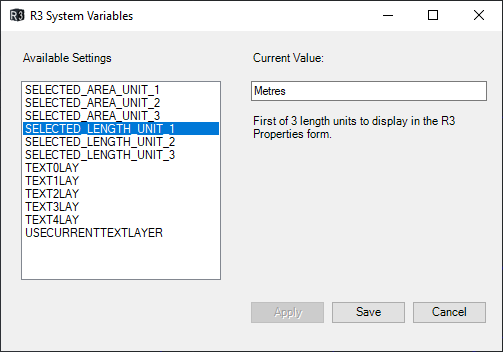
To change a variable, enter its name at the command line and follow the prompts.
Variable reference
| Variable | Commands affected | Description |
|---|---|---|
BLOCKLIBRARYFOLDER |
Various | Path to the folder where custom blocks are stored for use in drawing commands |
SELECTED_AREA_UNIT_1 |
R3PROPERTIES | First area unit displayed in the R3Properties panel |
SELECTED_AREA_UNIT_2 |
R3PROPERTIES | Second area unit displayed in the R3Properties panel |
SELECTED_AREA_UNIT_3 |
R3PROPERTIES | Third area unit displayed in the R3Properties panel |
SELECTED_LENGTH_UNIT_1 |
R3PROPERTIES | First length unit displayed in the R3Properties panel |
SELECTED_LENGTH_UNIT_2 |
R3PROPERTIES | Second length unit displayed in the R3Properties panel |
SELECTED_LENGTH_UNIT_3 |
R3PROPERTIES | Third length unit displayed in the R3Properties panel |
TEXT0LAY |
T0 | Layer for text placed by the T0 command |
TEXT1LAY |
T1 | Layer for text placed by the T1 command |
TEXT2LAY |
T2 | Layer for text placed by the T2 command |
TEXT3LAY |
T3 | Layer for text placed by the T3 command |
TEXT4LAY |
T4 | Layer for text placed by the T4 command |
USECURRENTTEXTLAYER |
T0–T4 | When true, text commands use the current drawing layer instead of predefined layers. Toggle with ToggleTextLayer. |
Notes
- Default layer names for T0–T4 are
TEXT0,TEXT1,TEXT2,TEXT3,TEXT4 - The
USECURRENTTEXTLAYERdefault istrue - The
SELECTED_LENGTH_UNITandSELECTED_AREA_UNITvariables correspond to the units selected in the R3PROPERTIES panel settings (gear icon). Changing them there updates these variables automatically.